
Nano Banana Photoshop Script
Master lightning-fast AI-powered Photoshop automation with our complete Nano Banana Photoshop plugin tutorial
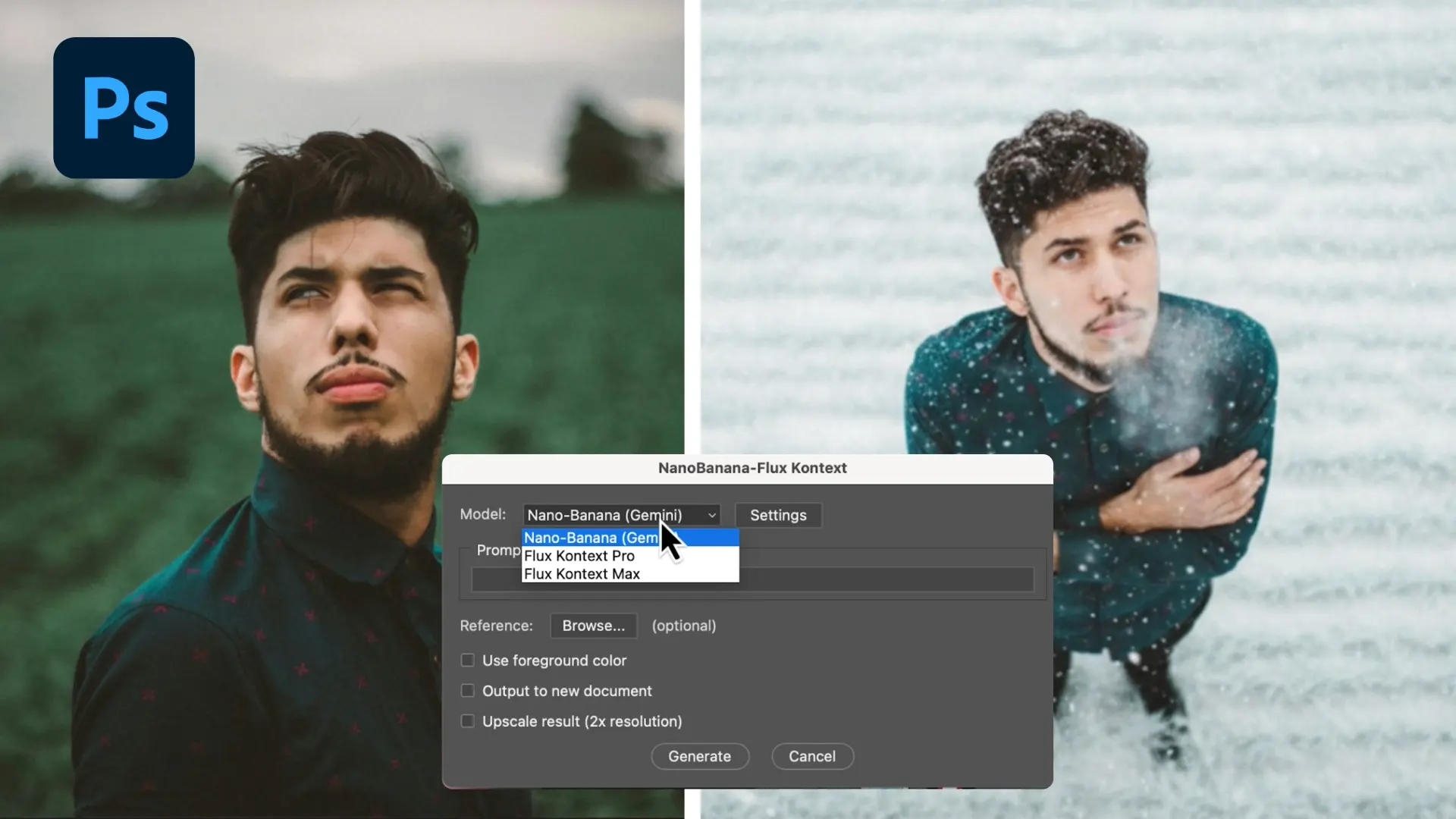
The Nano Banana Photoshop Script is a revolutionary AI-powered plugin that delivers lightning-fast image editing. This powerful Nano Banana plugin enables professional-grade AI edits based on your selection and simple prompts, with results seamlessly integrated as new layers in your Photoshop workflow.
Flux Kontext (Pro & Max)
Context-aware edits, typography, and lighting with advanced AI processing
Nano Banana (Gemini 2.5 Flash)
Fast generation with extras like Use Foreground Color and Reference Image
Seamless Integration
Works directly inside Photoshop with consistent lighting, shadows, and materials
Key Features of Nano Banana Photoshop Script
Discover the powerful capabilities that make the Nano Banana Photoshop plugin the ultimate AI-powered Photoshop automation tool for professional image editing and creative workflows
Lightning-Fast AI Processing
Experience rapid AI image generation with advanced Nano Banana machine learning models. Get professional Photoshop results in seconds with this powerful AI-powered Photoshop plugin.
Dual AI Model Support
Access Flux Kontext and Nano Banana AI models for different creative needs. This Nano Banana Photoshop plugin is perfect for context-aware Photoshop edits, typography, and professional image enhancement.
Native Photoshop Integration
The Nano Banana Photoshop Script works seamlessly within Adobe Photoshop's native interface. AI-generated content appears as new layers, maintaining your professional Photoshop workflow with this advanced AI-powered plugin.
Consistent Material Quality
Nano Banana maintains lighting, shadows, and materials consistency across your Photoshop edits, ensuring natural-looking results that blend seamlessly with this professional AI-powered Photoshop plugin.
Simple User Interface
User-friendly Nano Banana AI prompts that work seamlessly with Adobe Photoshop tools like selections, brushes, and color palettes. This AI-powered Photoshop plugin requires no complex learning curve.
Reference Image Support
Insert reference images into your Photoshop selections for precise control over Nano Banana AI generation. Achieve exactly the look you envision with this advanced AI-powered Photoshop plugin editing capabilities.
How to Use Nano Banana Photoshop Script
Follow these simple steps to get started with the Nano Banana Photoshop plugin and transform your creative workflow with AI-powered automation
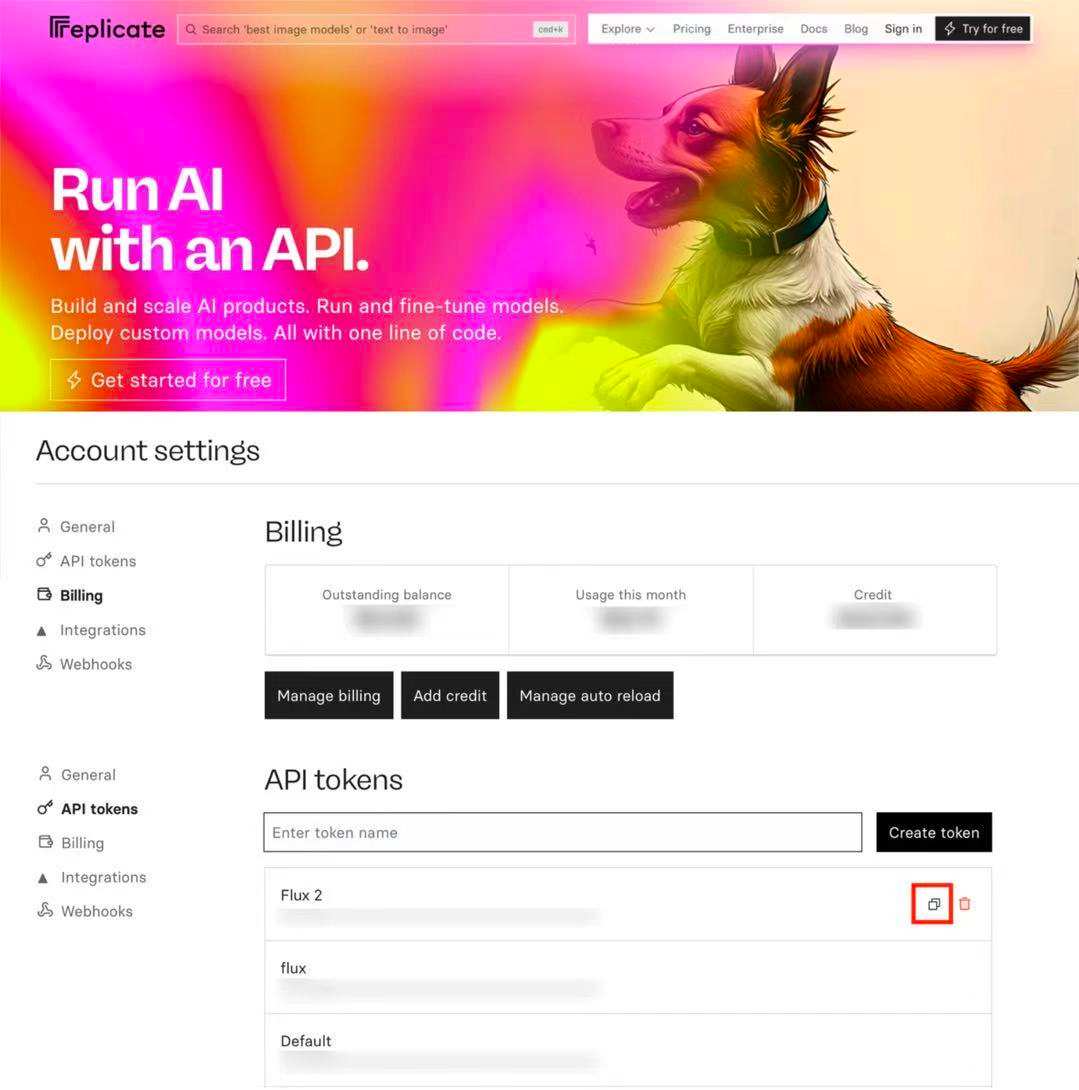
1. Set up Replicate
- Visit replicate.com and click Sign in
- Sign in with GitHub
- Open Account settings
- Add credit
- Open Billing in Account settings
- Click Add credit and add at least $10
- Current costs: ~$0.039 for Nano Banana, $0.04 for Flux Kontext Pro, $0.08 for Flux Kontext Max
- Disable auto reload
- Click Manage auto reload
- Make sure auto reload is disabled to avoid unwanted charges
- Create an API token
- In Account settings open API tokens
- Create a new token and copy it. You will paste this token in Photoshop later
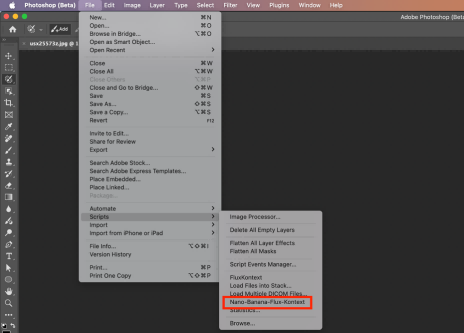
2. Installation
- Download the .jsx file
- Copy it to your Photoshop Scripts folder:
- macOS: /Applications/Adobe Photoshop [version]/Presets/Scripts/
- Windows: C:\Program Files\Adobe\Adobe Photoshop [version]\Presets\Scripts\
- Restart Photoshop
- The script will show up under File → Scripts → Nano-Banana-Flux-Kontext
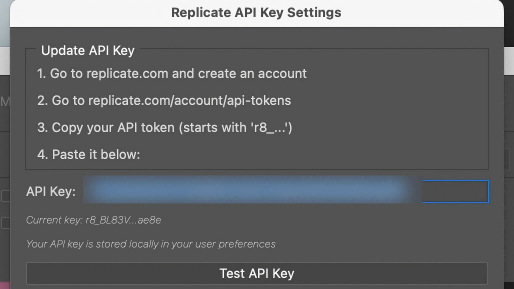
3. First Time Setup
- Open any document, then go to File → Scripts → FluxKontext
- The first time you open the script, the Settings will open first
- Paste your Replicate API token
- Note: On Windows, you might get an alert that the API key isn't valid. In that case, just click Update or OK, and it'll probably just work
- When you're done, choose a model:
- Nano Banana: with options for Foreground Color and Reference Image (only on macOS)
- Flux Kontext: context-aware edits, typography, and lighting
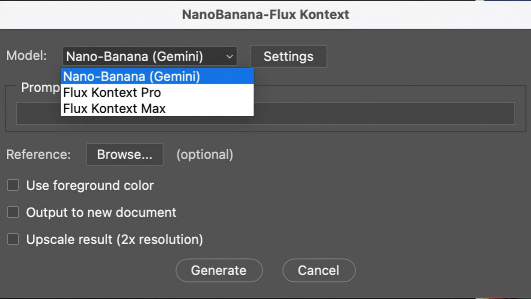
4. Run Your First AI Edit
- Make a selection in Photoshop
- Go to File → Scripts → Nano-Banana-Flux-Kontext
- Enter a short, specific prompt
- Choose a model:
- Nano Banana: with options for Foreground Color and (on macOS) Reference Image. With Reference image, you can insert an image in your selection
- Flux Kontext: context-aware edits, typography, and lighting
- Click Generate. The result appears as a new layer on top of your original
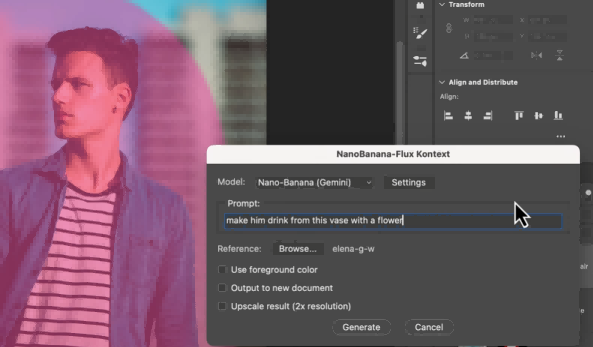
5. Tips
- Assign a keyboard shortcut: Edit → Keyboard Shortcuts
- Use Cmd-Shift-K and navigate to File > Scripts > Nano-Banana-Flux-Kontext
- Click in the field next to it and type your preferred shortcut
- Keep prompts short and specific
- Mention material, color, lighting
- Prompts in Flux Kontext need to be more specific than Nano Banana
- Make selections slightly larger to give the models more context
- Try drawing a sketch, and let Nano Banana make something out of it
- ⚠️ Windows Users: Script works with limitations. Command windows may appear briefly on Windows 10, and Reference Image option is unavailable. Usage is "at your own risk."
Ready to Get Started?
Get the Nano Banana Photoshop Script now and start creating amazing AI-powered edits!
Nano Banana Photoshop Script Use Cases
Explore real-world examples and effective prompts to master the Nano Banana Photoshop plugin. Learn advanced techniques for AI-powered image editing, creative automation, and professional workflows.


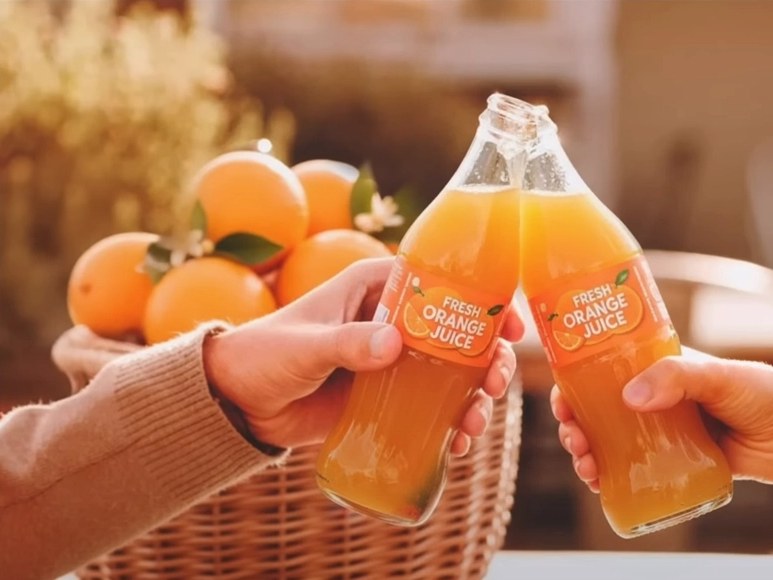
Case Study
Before
After
Prompt Used:
Nano Banana Photoshop Script User Reviews
Read authentic reviews from designers and artists who have mastered the Nano Banana Photoshop plugin for AI-powered creative workflows and professional image editing
"The Nano Banana Photoshop Script has completely revolutionized my Photoshop workflow. This AI-powered plugin integration is seamless and the results are incredible!"
"The Nano Banana Photoshop plugin has saved me hours of work. The quality of AI-generated edits is professional-grade and consistent."
"The Flux Kontext integration in the Nano Banana Photoshop Script is amazing. Context-aware edits that actually understand what I'm trying to achieve with this AI-powered plugin."
"The Nano Banana Photoshop plugin is easy to set up and use. The results are consistently high-quality and the AI-powered workflow integration is perfect."
"The Nano Banana Photoshop Script is the future of creative tools. This AI-powered plugin understands context and delivers exactly what I need every time."
"The Nano Banana Photoshop plugin is an incredible tool for rapid prototyping. The speed and quality of AI-powered results have transformed my creative process."
FAQs
The Nano Banana Photoshop Script is an advanced AI-powered plugin that integrates seamlessly with Adobe Photoshop. This comprehensive guide shows you how to use this powerful tool to automate complex editing tasks, enhance images, and streamline your creative workflow with intelligent prompts and AI model integration.
This guide explains how the Nano Banana Photoshop Script uses advanced AI models (Flux Kontext and Nano Banana) to analyze your image selections and apply intelligent enhancements. Learn how to use prompts effectively to automatically detect objects, adjust colors, remove backgrounds, and apply various effects based on your creative vision.
According to our comprehensive guide, the Nano Banana Photoshop Script is compatible with Photoshop CC 2018 and later versions. This tutorial recommends using the latest version of Photoshop for optimal performance and access to all advanced AI-powered features.
Yes, this guide shows that the Nano Banana Photoshop Script is designed for both personal and commercial use. Whether you're a freelance photographer, graphic designer, or part of a creative agency, our tutorial helps you master this AI-powered plugin to enhance your professional workflow and deliver high-quality results to your clients.
Our guide demonstrates that the Nano Banana Photoshop Script uses advanced AI models trained on millions of professional images to provide highly accurate enhancements. This tutorial shows you how to optimize your prompts and settings to achieve professional-grade results, though outcomes may vary depending on input image quality and complexity.
Absolutely! This comprehensive guide shows you how to customize the Nano Banana Photoshop Script with extensive options. Learn to adjust AI parameters, create custom prompts, set automation levels, and configure output formats to match your specific workflow requirements and creative preferences.
Yes, this guide explains that batch processing is one of the key features of the Nano Banana Photoshop Script. Our tutorial shows you how to process hundreds of images simultaneously with consistent results, making it perfect for photographers, e-commerce businesses, and anyone who needs to handle large volumes of images efficiently.
This guide covers that the Nano Banana Photoshop Script supports all major image formats including JPEG, PNG, TIFF, PSD, and RAW files. Our tutorial shows you how the plugin can export in various formats optimized for different platforms and use cases, maintaining quality while optimizing file sizes.
Yes! The Nano Banana Photoshop Script is completely free to download and use. Simply share this comprehensive guide on your social media platforms, and you'll receive the script for free. This AI-powered Photoshop plugin offers professional-grade features at no cost, making it accessible to all designers, photographers, and creative professionals.